Tor Browser Explained: What It Hides and What It Does Not
Privacy
Tor Browser is the rare privacy tool that gets weaker the more you personalise it. Install a favourite extension, tweak a setting, maximise the window, and you have made yourself easier to pick out rather than harder. Almost nothing else works that way, and it explains most of what people find odd about it.
What Tor Browser actually is
Two things in one download, and they do different jobs.
The first is the Tor network itself, thousands of volunteer-run servers that pass your traffic along a chain before it reaches the site you asked for. The second is the browser, a modified build of Firefox with the tracking defences turned up far past anything a mainstream browser ships. The current stable release is Tor Browser 15.0.21, and the 15.0 series, out in October 2025, is built on Firefox ESR 140, so the engine underneath is the same long-term-support Firefox businesses run.
Both are maintained by the Tor Project, a nonprofit, and the software is free. In September 2024 the Tails project, which makes the live operating system that routes everything through Tor, merged into it.
The three relays, and what each one knows
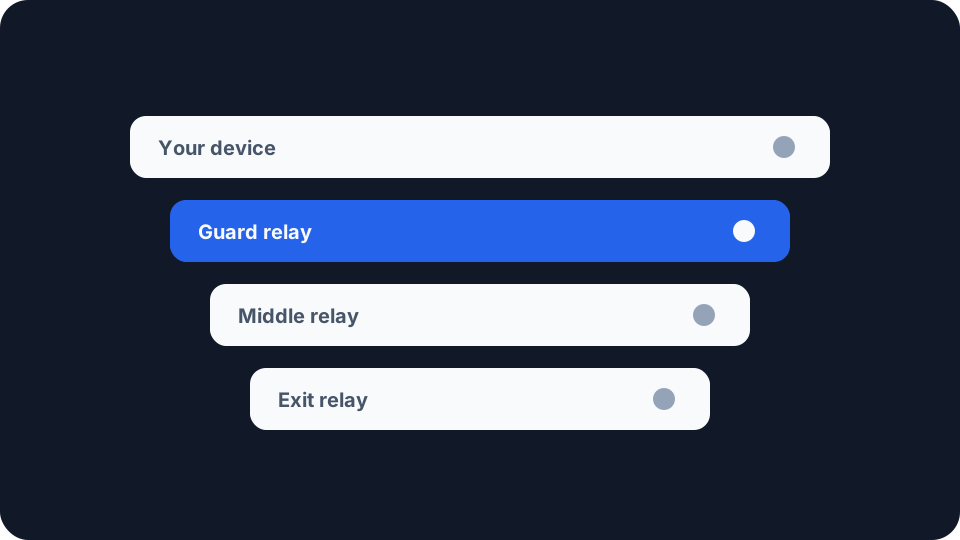
Your traffic passes through at least three separate servers before it reaches its destination, with a distinct layer of encryption applied for each one. That layering is where the onion in onion routing comes from, and the reason no single relay ever holds the whole picture.
The guard relay is the only one that sees you. It receives encrypted traffic straight from your computer, so it knows your real IP address and knows you are using Tor. It does not know which site you asked for. Your guard changes only every two to three months, which looks like a weakness and is deliberately the opposite: rotating it constantly would give a patient observer many more chances to land on a relay they control.
The middle relay exists to break the link. It passes encrypted traffic from the guard to the exit, and knows neither who you are nor where you are going.
The exit relay makes the real connection, and this is the one to understand. It strips the last layer and contacts the website on your behalf, which means it sees whatever you sent into the network. It has no idea who sent it. If the site uses HTTPS, and almost all now do, the exit sees only which server you reached, not what passed between you. That is why HTTPS still matters inside Tor, and why Tor Browser ships with HTTPS-Only Mode turned on.
There is a further separation most people never notice. Tor Browser builds circuits around the site in the address bar, so if two websites load the same third-party tracker, each connection goes over a different circuit and the tracker cannot tell they came from one browser.
The encryption underneath all of this is being replaced. In November 2025 the Tor Project announced that tor1, the original relay encryption design written when AES was new, is giving way to Counter Galois Onion. The practical gain is protection against tagging attacks, where someone running two relays alters traffic at one end and watches for the distortion at the other to prove the two flows are the same one.
Why you are told not to change anything
Anonymity here is a crowd, not a cloak. The goal is not to make your browser undetectable, which is impossible, but to make it indistinguishable from every other Tor Browser. The Tor Project describes this as reducing the number of distinguishable buckets rather than hiding attributes outright, since things like your operating system and language cannot be removed without breaking the web.
Letterboxing is the most visible example. Window dimensions are a strong identifier, so Tor Browser rounds the content window to a multiple of 200 by 100 pixels and pads the rest with grey. Those grey bars are not a rendering fault, they are the feature. Resize the window to something unusual and you climb out of the crowd you were hiding in. To see what a window size and the signals around it give away, our Browser Fingerprint Test shows the values a site would collect from your ordinary browser, and how sites track you without cookies covers the mechanics in full.
Add-ons carry the same cost. An extension changes how pages render and how the browser behaves, so an unusual combination is itself a signature. The Tor Project’s advice is blunt: do not install additional add-ons or plugins, because they may bypass Tor or undermine the protections already there.
The security level is the one setting you are meant to touch. Standard leaves everything enabled. Safer disables JavaScript on non-HTTPS sites, turns off some fonts and mathematical symbols, and makes audio and video click to play. Safest disables JavaScript everywhere by default and strips out most images, media and icons. Safest is genuinely safer and it breaks much of the modern web, so choose the level that matches your risk, not the one that sounds most impressive.
What it costs you, honestly
Speed is the obvious one. Your traffic takes three hops through machines donated by strangers, often on ordinary connections in other countries. The Tor Project puts the constraint plainly, noting that the current network is quite small compared with the number of people who need to use it. Video calls and large downloads are not what this is for.
You will be treated as suspicious, and that is by design. Exit relay addresses are published openly so operators can identify them, which means any service that wants to can spot Tor traffic instantly. In practice you get more captchas, some sites refuse you outright, and banks or email providers may lock the account because a login appeared from another continent. Tor’s own manual is candid that the only route back is the site’s normal account recovery. To see how a connection reads before you rely on it, how your connection looks to fraud detection reports whether an address is flagged as a VPN, proxy, datacentre or Tor exit.
Only what goes through the browser is protected. Tor covers applications configured to use it, and nothing else. Torrent clients are the classic failure, because they routinely ignore proxy settings and announce your real address to the tracker anyway. Documents are the quieter one: open a PDF you downloaded over Tor while you are still online, and the application that opens it can fetch remote content directly, outside Tor.
Your provider still knows you are using it. Tor hides where you are going from the network you are sitting on, not the fact that you are using Tor. Bridges, which are unlisted entry points, exist for people to whom that distinction matters. On an ordinary connection your ISP already sees more than most people assume, and what your ISP can actually see sets out exactly which parts survive encryption.
Where it is the right tool, and where it is not
Tor is strong when what you need to hide is the link between you and what you are reading. A journalist checking a source, someone researching a diagnosis on a shared home network, a person in a country where a site is blocked: those are the cases it was built for, and it handles them better than anything else available for free.
It is the wrong tool when convenience is the point. A faster connection to a streaming service, or cover for every app on the device, describes a different category of product with a different threat model, and the difference between a VPN and a proxy is a useful place to start on how those trade off. Tor also stops being anonymity the moment you log in as yourself: the network still hides your location, but a site you have signed into knows exactly who you are. Which of those threat models is yours, and what the Tor Project says about running both tools at once, is set out in VPN vs Tor.
What you can actually do about it
Download it from torproject.org and nowhere else, and verify the signature if you have reason to think your connection is interfered with.
Leave the browser alone. No extensions, no changed preferences, no resizing the window to fill the screen. Pick a security level and stay on it.
Decide before you start whether the session is anonymous or logged in, and do not mix the two in one window. New Identity exists to draw that line.
Do not torrent over it, and do not open downloaded documents while you are still connected.
Use a bridge if being seen to use Tor is itself the risk, rather than assuming the network hides that on its own.
None of this makes you anonymous in an absolute sense, and the Tor Project has never claimed otherwise. What it removes is the easy link between an address and a person, which for most realistic threats is the part that matters.
Seeing the difference for yourself
The clearest way to understand what Tor changes is to look at your connection before and after. Your IP address details show the address, provider and approximate location an ordinary connection hands over on every request, which is exactly what the guard relay stands in front of. Open the same page through Tor Browser and you get an exit relay somewhere else entirely.
Then run the proxy and VPN check on both. The ordinary connection reads as a residential address with no flags. The Tor one reads as a known exit node, immediately, which is the honest cost of the protection and the reason so many sites push back on it.